
The Browser Layer for Scraping at Scale

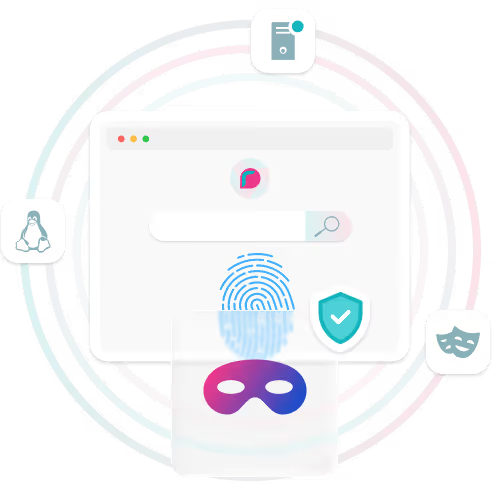

Chrome represents over 70% of global browser traffic, which makes engine choice more than a preference, it directly affects how believable your traffic looks at scale.
rayobrowse is built on a maintained Chromium fork so that each session behaves like a real Chrome environment, not a simulated wrapper.
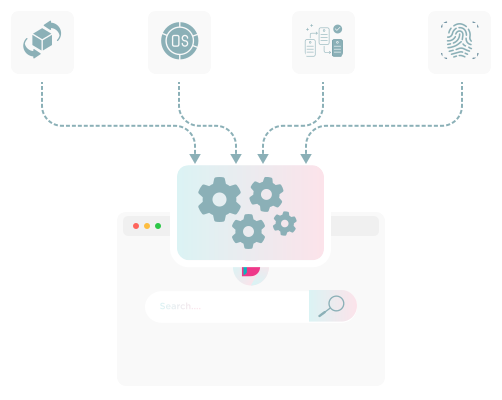
At launch, low-level fingerprint patches are applied across OS metadata, rendering characteristics, hardware signals, and environment properties. The goal is to start with a coherent Chromium instance that presents a consistent device profile from the beginning.
Architecture & Deployment
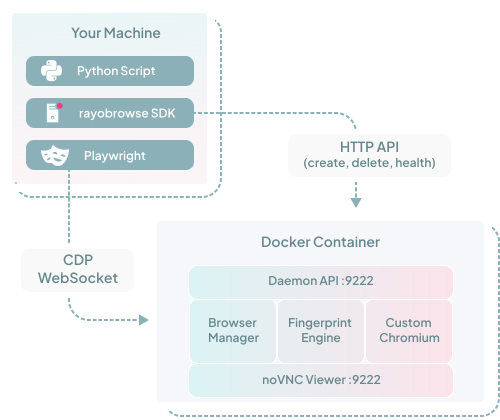
rayobrowse runs inside a fully Dockerized environment, which means there are no host-level dependencies beyond Docker and Python. The container bundles the custom Chromium binary, the fingerprint engine, and the daemon server, keeping the browser logic isolated from your application code.
The image is built and tested for both amd64 and ARM64 architectures and validated in CI/CD on every release, meaning consistent behavior across local development machines, Linux servers, and cloud environments.
You can run it locally, on Linux servers, or in cloud environments. It can also operate in daemon mode, allowing you to run your own remote browser farm with centralized control.
Install it. Connect over CDP. Scale it.
.svg)
Integration






Because we depend on it ourselves, we:
Built for Plug-and-Play
import logging
import sys
from rayobrowse import create_browser
from playwright.sync_api import sync_playwright

logging.basicConfig(level=logging.INFO, format='%(asctime)s - %(levelname)s - %(message)s')

def main():
    target_os = "windows"  # android and windows tested; macos and linux experimental
    target_browser = "chrome"
    version_min = 144
    version_max = 144

    logging.info(f"Requesting browser: OS={target_os}, Chrome {version_min}-{version_max}")

    try:
        ws_url = create_browser(
            headless=False,
            target_os=target_os,
            browser_name=target_browser,
            browser_version_min=version_min,
            browser_version_max=version_max,
            #proxy="http://username:password@host:port",
        )
        logging.info(f"Browser ready: {ws_url}")

        with sync_playwright() as p:
            browser = p.chromium.connect_over_cdp(ws_url)

            context = browser.contexts[0] if browser.contexts else browser.new_context()
            page = context.pages[0] if context.pages else context.new_page()

            wait = 30000

            page.goto("https://example.com", wait_until="commit", timeout=wait)
            page.wait_for_load_state("domcontentloaded", timeout=wait)
            page.wait_for_timeout(3000)

            logging.info(f"Page title: {page.title()}")

            try:
                if sys.stdin.isatty():
                    input("[INFO] Press Enter to close the browser...")
                else:
                    page.wait_for_timeout(3000)
            except EOFError:
                page.wait_for_timeout(3000)

            browser.close()

    except Exception as e:
        logging.error(f"An error occurred: {e}")

if __name__ == "__main__":
    main()
import http.server
import json
import logging
import socket
import sys
import threading
import urllib.request
from contextlib import contextmanager
from urllib.parse import urlparse
from rayobrowse import create_browser
from selenium import webdriver
from selenium.webdriver.chrome.options import Options
from selenium.webdriver.chrome.service import Service
from webdriver_manager.chrome import ChromeDriverManager
logging.basicConfig(level=logging.INFO, format="%(asctime)s - %(levelname)s - %(message)s")
def _free_port() -> int:
with socket.socket() as s:
s.bind(("127.0.0.1", 0))
return s.getsockname()[1]
@contextmanager
def cdp_shim(ws_url: str):
parsed = urlparse(ws_url)
daemon_endpoint = f"http://{parsed.hostname}:{parsed.port}"
browser_id = parsed.path.strip("/").split("/")[-1] # br_xxxxxxxx
base_url = f"{daemon_endpoint}/cdp/{browser_id}"
class _ShimHandler(http.server.BaseHTTPRequestHandler):
def do_GET(self):
path = self.path.lstrip("/")
proxy_url = f"{base_url}/{path}" if path else f"{base_url}/json/version"
try:
with urllib.request.urlopen(proxy_url, timeout=5) as resp:
body = resp.read()
self.send_response(200)
self.send_header("Content-Type", "application/json")
self.send_header("Content-Length", str(len(body)))
self.end_headers()
self.wfile.write(body)
except Exception as exc:
body = json.dumps({"error": str(exc)}).encode()
self.send_response(500)
self.send_header("Content-Type", "application/json")
self.send_header("Content-Length", str(len(body)))
self.end_headers()
self.wfile.write(body)
def log_message(self, *args):
pass # Suppress server access logs
port = _free_port()
server = http.server.HTTPServer(("127.0.0.1", port), _ShimHandler)
thread = threading.Thread(target=server.serve_forever, daemon=True)
thread.start()
try:
yield f"127.0.0.1:{port}"
finally:
server.shutdown()
def main():
target_os = "windows" # android and windows tested; macos and linux experimental
target_browser = "chrome"
version_min = 144
version_max = 144
logging.info(f"Requesting browser: OS={target_os}, Chrome {version_min}-{version_max}")
try:
ws_url = create_browser(
headless=False,
target_os=target_os,
browser_name=target_browser,
browser_version_min=version_min,
browser_version_max=version_max,
#proxy="http://username:password@host:port",
)
logging.info(f"Browser ready: {ws_url}")
parsed = urlparse(ws_url)
daemon_endpoint = f"http://{parsed.hostname}:{parsed.port}"
browser_id = parsed.path.strip("/").split("/")[-1]
with urllib.request.urlopen(
f"{daemon_endpoint}/cdp/{browser_id}/json/version", timeout=5
) as resp:
version_info = json.loads(resp.read())
chrome_version = version_info["Browser"].split("/")[1].split(".")[0]
logging.info(f"Detected Chrome version: {chrome_version}")
with cdp_shim(ws_url) as shim_addr:
options = Options()
options.debugger_address = shim_addr
service = Service(ChromeDriverManager(driver_version=chrome_version).install())
driver = webdriver.Chrome(service=service, options=options)
logging.info("Selenium connected to stealth browser")
wait = 30
driver.set_page_load_timeout(wait)
driver.get("https://example.com")
logging.info(f"Page title: {driver.title}")
try:
if sys.stdin.isatty():
input("[INFO] Press Enter to close the browser...")
else:
import time; time.sleep(3)
except EOFError:
import time; time.sleep(3)
driver.quit()
except Exception as e:
logging.error(f"An error occurred: {e}")
if __name__ == "__main__":
main()'use strict';
const puppeteer = require('puppeteer-core');
const DAEMON_ENDPOINT = process.env.RAYOBYTE_ENDPOINT || 'http://localhost:9222';
const API_KEY = process.env.STEALTH_BROWSER_API_KEY || '';
const BROWSER_CONFIG = {
headless: false,
os: 'windows', // android and windows tested; macos and linux experimental
browser_name: 'chrome',
browser_version_min: 144,
browser_version_max: 144,
// proxy: 'http://username:password@host:port',
};
async function createBrowser() {
const payload = { ...BROWSER_CONFIG };
if (API_KEY) payload.api_key = API_KEY;
const resp = await fetch(`${DAEMON_ENDPOINT}/browser`, {
method: 'POST',
headers: { 'Content-Type': 'application/json' },
body: JSON.stringify(payload),
});
if (!resp.ok) {
throw new Error(`Daemon returned HTTP ${resp.status}`);
}
const data = await resp.json();
if (!data.success) {
throw new Error(data.error?.message || 'Browser creation failed');
}
// Normalize 0.0.0.0 → localhost for local Docker setups
const wsUrl = data.data.ws_endpoint.replace('0.0.0.0', 'localhost');
return wsUrl;
}
async function main() {
console.log(`Creating browser (OS=${BROWSER_CONFIG.os}, Chrome ${BROWSER_CONFIG.browser_version_min}-${BROWSER_CONFIG.browser_version_max})...`);
const wsUrl = await createBrowser();
console.log(`Browser ready: ${wsUrl}`);
const browser = await puppeteer.connect({ browserWSEndpoint: wsUrl });
const pages = await browser.pages();
const page = pages[0] || await browser.newPage();
await page.goto('https://example.com', { waitUntil: 'domcontentloaded', timeout: 30000 });
const title = await page.title();
console.log(`Page title: ${title}`);
if (process.stdin.isTTY) {
console.log('[INFO] Press Enter to close the browser...');
await new Promise(resolve => {
process.stdin.once('data', resolve);
});
} else {
await new Promise(resolve => setTimeout(resolve, 3000));
}
await browser.disconnect();
console.log('Done.');
}
main().catch(err => {
console.error('Error:', err.message);
process.exit(1);
});from rayobrowse import create_browser
from playwright.sync_api import sync_playwright
urls = [create_browser(headless=False, target_os="windows") for _ in range(3)]
with sync_playwright() as p:
for ws_url in urls:
browser = p.chromium.connect_over_cdp(ws_url)
browser.contexts[0].pages[0].goto("https://example.com")
input("Press Enter to close all...")ws_url = create_browser(
headless=False,
target_os="windows",
browser_name="chrome",
browser_version_min=144,
browser_version_max=144,
)ws_url = create_browser(
fingerprint_file="fingerprints/windows_chrome.json"
)rayobrowse Features


Licensing & Usage

(Rayobyte Customers)
(Bring Your Own Proxy)
Get Started
